Friday, 21 September 2012

Nigeria's Low-Cost Tablet Computer "Inye" Featured On BBC's Series African Dream

Saheed Adepoju:
I pitched the idea to my parents,
who gave me £40,000 to start with
Earlier this year, I did an article on Nigeria's low cost tablet computer "Inye" built by Saheed Adepoju, a young man with big dreams, whom I referred to as the "African Steve Jobs". The Inye, in case you are hearing for the first time is a tablet computer designed for the African market.

Recently, the hand work of the 29-year-old entrepreneur was featured on the BBC's Series African Dream, where he disclosed some facts about the invention of the African low cost iPad.

According to the 29-year-old entrepreneur, his machine's key selling point is its price - $350 (£225) opposed to around $700 for an iPad. He believes that, because of this, there is a big market for it in Nigeria and elsewhere in Africa, particularly amongst students.

He is also hoping to sell his tablet - which runs on the Google Android operating system - to the Nigerian government and plans to have at least one computer in each local government area.

"The Inye is a mobile internet device. It gives you access to the internet; it allows you to play media files and watch movies. What we have is an 8-inch device, a device that is half-way between a laptop and a mobile phone," he told the BBC's series African Dream.

"You have the standard software applications that come pre-installed and then you have the ones that we are working with various local developers to bundle on," he added.

Among those local apps there is one designed to raise awareness about HIV and others related to water and sanitation.

"We work with local developers that have expertise in particular areas so that we don't end up doing so much work and we just have a collaborative way of doing things together," he said.

'Word of mouth'
Inye cheap iPad
Mr Adepoju has a background in software development and is a Sun-certified Java programmer. After doing a first degree in maths and computer science in Nigeria, he completed another one in advanced computing by research at Bournemouth University, in the United Kingdom. Upon graduation in 2009, he returned to his home country and started working for a consulting firm.

"Within eight months I got fired, primarily because of differences in approach to doing business. In the middle of all this, the Apple iPad launched, back in January of 2010, which inspired us to actually look to build such a product within the African marketplace," the entrepreneur told the BBC Africa's Chris Ewokor.

He said that, with that goal in mind, he borrowed money from friends and family, raising a total of about $60,000.

According to him, all of that went on the devices and the logistics - there was no budget for marketing, so early advertising was "word of mouth" on social media.

The first 100 units of the Inye, which means One in Nigeria's Igala language, were built in China and, after receiving feedback from its users, a second version was launched in May 2011.

Encipher Group, the company he cofounded with web developer Anibe Agamah, also offers customised IT services and products, including cloud computing, which are mostly based on open technology to keep costs down.

Raising capital
According to Mr Adepoju, the company and the apps it develops are focused on preserving local culture through technology and making products which are specific to the local market.

Another product that the firm has been working on is Encipher TV, a box where people can watch African television, plays and films. However, he says that it has not been easy to raise capital in order to develop the business faster.

"Here venture capital (VC) is still in its infancy and most VC firms wound want to invest in tried and trusted companies that have gained some form of traction," he said.

"We face the challenge of getting people to listen to the various propositions. We've been to a number of private investors and also to the government," he explained.

Not surprisingly, his immediate plan is to "try and raise capital from whatever sources we can get - locally, internationally or privately - and to try and still to push the brand forward as much as we can".

Will his tablet computer succeed in such a competitive environment? Only time will tell but Mr Adepoju and his colleagues are adamant that it will, not only in Nigeria but also in other African markets.

For full spec and features of the "Inye" read: African Steve Jobs! Nigerian Student Launches ‘African iPad’ in United Kingdom

About African Dream
African Dream is broadcast on the BBC Network Africa programme every Monday morning, and on BBC World News throughout the day on Fridays

Every week, one successful business man or woman will explain how they started off and what others could learn from them.
Article was originally published on BBC News Africa

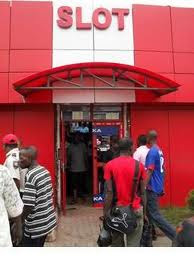
SLOT Systems Nigeria: Branches and Price List Of Phones(BlackBerry,Iphones, iPads, Nokia, Samsung, Sony Ericsson, LG etc)

If you reside in Lagos State or you live very close to Lagos, then you might find this post interesting. When it comes to buying an original mobile phone there is need to make inquiries, that is if you really want to enjoy your hard earned money! I may not be the first person to tell you that there are thousands of fake mobile phone shops scattered in the street of Lagos and beyond. So far, people have testified and are still testifying of product and services rendered by SLOT SYSTEMS NIGERIA, myself is a living testimony!

When it comes to selling ORIGINAL mobile phones, Slot Systems Nigeria is the best. You buy mobile phones with full guarantee and of course receive some bonus on customer care related services. You can try them out today to have your own experience! To help you narrow down your search, I added some branches of Slot Nigeria for those living very far from Lagos. However, this post was primarily targeted for Lagos State residents.


Where is Slot Systems Nigeria Located in Lagos State?
Slot Systems Nigeria is primarily situated in Ikeja, the State Capital of Lagos State. You can get them precisely at the address below:

SLOT SYSTEMS NIGERIA
No 2B, Medical Road Ikeja Lagos
Phone No: 01-7388168, 08034620000

See below the front side of Slot Systems Outlet in Lagos as at the time of this post:
SLOT Systems Nigeria: Branches and Price List Of Phones(BlackBerry,Iphones, iPads, Nokia, Samsung, Sony Ericsson, LG etc)
Other Branches of Slot Systems Nigeria Include:
APAPA BRANCH 
95, Kofo Abayomi street, Opp. Ceaser's Palace, Apapa Wharf.
Phone No: 07028863074
Lagos - State.

COMPUTER VILLAGE BRANCH
15/19 Ola-Ayeni Street. Ikeja Lagos
Phone No: 07029291903, 01-8228716

AKURE BRANCH 
33, Oyemekun Road Opposite Wema Bank, Akure
Phone No: 08033035850
Ondo - State

PORT-HARCOURT BRANCH 1
Lenus Shopping Plaza, Abacha Rd.
Phone No: 07029333643

PORT-HARCOURT BRANCH 2
Aba Road, Waterline Roundabout
Phone No: 07029333643

OSHODI BRANCH
Arena Complex, Shop C5, 01, 02, 19 & 20
Bolade bus-stop, oshodi
Lagos
Phone No: 08191350602, 01-7384211

GSM VILLAGE BRANCH
Block A, Shop 2 Airport Bus-stop.
Phone No: 07028415477

ABUJA BRANCH
Suite C16/17 New Bannex Plaza
Wuse 2.
Phone No: 07028950193

VICTORIA ISLAND BRANCH
13A, Saka Tinubu Street.
Phone No: 07028864634
Lagos

ABEOKUTA BRANCH
19 Lalubu road
Oke-ilewo
Abeokuta, ogun state
08191432299

IBADAN
Mokola roundabout
MRS filling station
02-8771730,08169408595,08033456672

EKET
68, Eket Oron road
Eket, Akwa-Ibom State
07042774461

UYO
Plot 69, line A
NDDC road, Ewet Housing Estate
Uyo
08191846151,085-828933,085-828944

FESTAC
51 road, 512 junction, festac town lagos
07031543570, 08190409086

CALABAR
18 Ndidem Usiang iso
besides Lions club park
calabar
08191846150,08133553359
What Brands of Phones Can Be Found at Slot Systems Nigeria?
Like I said earlier, Slot Systems Nigeria is a home for all your mobile phone needs. They have all kinds of mobile phones ranging from BlackBerry, Iphones, Nokia phones, Samsung, LG, Sony Ericsson, etc. When you get there you will have many choice to make!
Can I View Products and Service of Slot Nigeria Online?
Of course you can. Their website address is http://www.slotlimited.com

You can view the Price List Of Mobile Phones Sold At Slot Nigeria  so you can know the prize range of their products and possibly how much you will be budgeting.

How To Personalize Your Gmail with Different Themes

Gmail by default has a simple look which of course is very professional for most people. While it is programmed to appear simple and promising, there are also an option to freely personalize it with different themes. Google has remained the number one when it comes to making their products counts and Gmail being its free email service is not left behind. In this post, I will showing you a very simple way of personalizing your Gmail account with several beautiful themes which you can play with until you find the best of them or the one that suits your taste. Lets see the screen-shot of some these themes:


How To Personalize Your Gmail Inbox

Remember, I said it very simple, and simple it is!

Step 1: Log into Gmail.com and sign in using your Gmail  address
Step 2: Once you are on Inbox click on "Settings" on the left side of your Inbox and go to "themes" section.
Step 3: Select from the several themes and you are done!

Enjoy your newly personalized Gmail Account! Cheers!

How to Generate Google Analytics Tracking Code [Theory and Video Tutorial]

Today we shall be looking at how you can generate your blog Google Analytics tracking code using the theoretical and video approach. I decided to make this post following the experience I had when I was fond of changing templates on my blogs.

Each time you make changes or upload a new template to an existing blog containing a Google analytics code, the change affects the tracking code, which means you will be having problem of tracking the activities on your blog.

Now because you only get to generate the tracking code the straight way only when you are adding the code for the first time, it is not the same when you want to generate it again. Hence, this post will help you learn the means of generating your blog Google analytics code.

Step 1: Go to http://www.google.com/analytics/ and sign in using the email address you used to open your blog

Step 2: Once you are logged on your account, your account profile will display just like the screen-shot below"

As indicated on the screen-shot above, click on +Add new profile" and then proceed to the next step

Step 3: The next step will prompt you to choose an existing profile or create an entirely profile to generate the code. Select the "add a profile for a new domain" option and fill enter your blog URL in the form www.yourblogname.com (in my case it would be www.naijatechblog.com) See the screen-shot below:


Step 4: Also follow the arrows as they have been added on the screen-shot above to complete the process. Select the "add a profile for a new domain > type in the domain name or URL of your blog > type in your country and finally hit the "Continue button below it.

Step 5: The Google Analytics Tracking Code will immediately be generated for you which will look like the one below:

<script type="text/javascript">
    var gaJsHost = (("https:" == document.location.protocol) ? "https://ssl." : "http://www.");
    document.write(unescape("%3Cscript src='" + gaJsHost + "google-analytics.com/ga.js' type='text/javascript'%3E%3C/script%3E"));
    </script>
    <script type="text/javascript">
    try{
    var pageTracker = _gat._getTracker("UA-xxxxxx-x");
    pageTracker._trackPageview();
    } catch(err) {}
    </script>


Step 6: Paste the code immediately before the </body> tag or immediately before the <head> tag of your page, make sure not to alter the code, leave it the way it is.

Allow Google some hours to gather data from your blog, so that your blog's status can be ascertained.

If you find it hard following my steps above (which I doubt you will have) then proceed to the video tutorial below:
 

<script type="text/javascript">

  var _gaq = _gaq || [];
  _gaq.push(['_setAccount', 'UA-35006320-1']);
  _gaq.push(['_trackPageview']);

  (function() {
    var ga = document.createElement('script'); ga.type = 'text/javascript'; ga.async = true;
    ga.src = ('https:' == document.location.protocol ? 'https://ssl' : 'http://www') + '.google-analytics.com/ga.js';
    var s = document.getElementsByTagName('script')[0]; s.parentNode.insertBefore(ga, s);
  })();

</script>